Output Devices of Computer
Published: 8 Feb 2026
Have you ever typed something on your computer and instantly saw it on the screen? Or clicked “Print” and got a paper copy? That is the job of the output devices of computer.
Output devices are the reason a computer feels useful to humans. Without them, a computer could process data, but you would not be able to see, hear, or get results from it.
In this guide, you will learn output devices in the easiest way — with examples, categories, a comparison table, and extra information that most competitor articles miss.
What Are Output Devices of Computer?
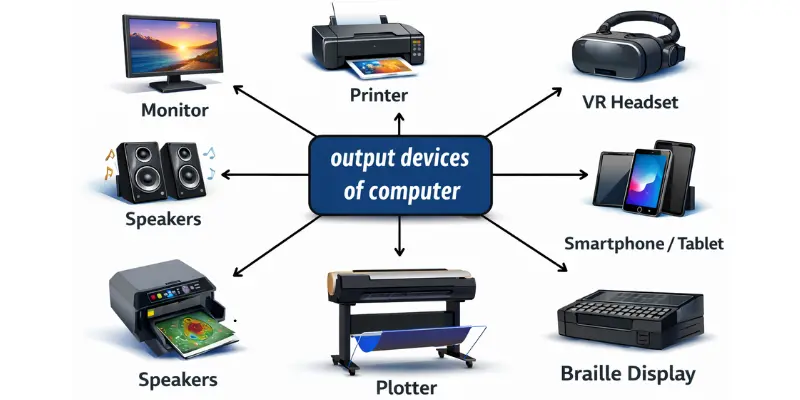
Output devices of a computer are hardware components that display or deliver the results of processing in a form humans can understand.
A computer processes data inside the CPU, but output devices help show the final result as:
- Visual output (screen, projector)
- Audio output (speakers, headphones)
- Hard copy output (printer)
- Tactile output (Braille display, vibration feedback)
Output Devices in the Input–Process–Output Cycle
A computer works in a simple cycle:
Input → Processing → Output
Example:
- You type a message (Input)
- CPU processes it (Processing)
- It appears on the screen (Output)
This is why output devices are essential in every computer system.
Types of Output Devices of Computer (Main Categories)
Most output devices of computer fall into 4 major categories:
1) Visual Output Devices
These show results in the form of images, text, and videos.
Examples:
- Monitor
- Projector
- VR headset
2) Audio Output Devices
These produce sound.
Examples:
- Speakers
- Headphones
- Earbuds
3) Hard Copy Output Devices
These give output on paper or physical material.
Examples:
- Printer
- Plotter
4) Tactile Output Devices
These give output through touch.
Examples:
- Braille display
- Haptic feedback devices
List of Common Output Devices of Computer (With Examples)
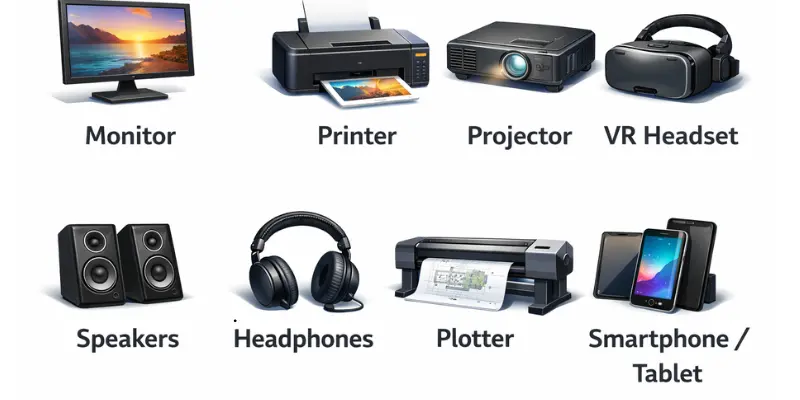
Here are the most important output devices you should know:
1. Monitor (Most Common Output Device)
A monitor displays text, images, graphics, and videos.
Why it’s important
- It is the primary visual output device.
- It helps users interact with the computer easily.
Types of monitors
- LCD (common, lightweight)
- LED (better brightness, energy-efficient)
- OLED (high-end, best colors and contrast)
- CRT (old, bulky, mostly outdated)
Common uses
- Study and online learning
- Gaming
- Office work
- Video editing
2. Printer (Hard Copy Output Device)
A printer produces output on paper. It converts digital files into a physical form.
Types of printers
- Inkjet printer (good for color and photos)
- Laser printer (fast, best for office documents)
- Dot matrix printer (old but used for receipts and forms)
- 3D printer (creates real 3D objects)
Common uses
- Printing assignments
- Office reports
- Photos and certificates
3. Speakers (Audio Output Device)
Speakers produce sound from the computer.
Types of speakers
- Built-in laptop speakers
- External wired speakers
- Bluetooth speakers
- Surround sound systems (5.1 / 7.1)
Common uses
- Music and movies
- Online meetings
- Gaming sound effects
- Alerts and notifications
4. Headphones (Personal Audio Output)
Headphones are output devices that allow private listening.
Types
- Wired headphones
- Wireless/Bluetooth headphones
- Noise-cancelling headphones
- Gaming headsets (often I/O devices)
Why people prefer headphones
- Better focus
- Privacy
- Clearer sound
5. Projector (Large Screen Output Device)
A projector displays computer output on a wall or screen.
Types of projectors
- LCD projector
- DLP projector
- LED projector
Common uses
- Classroom lectures
- Business presentations
- Home cinema
- Public seminars
6. Plotter (For Large Drawings)
A plotter is a special output device used to print large graphics and technical drawings.
Where plotters are used
- Architecture (blueprints)
- Engineering designs
- Maps
- CAD projects
Types of plotters
- Drum plotter
- Flatbed plotter
- Inkjet plotter
7. Smartboard / Interactive Display (Input + Output)
A smartboard works as both input and output.
It displays content and also lets users touch, draw, or write.
Common uses
- Schools and coaching centers
- Offices and meetings
- Training sessions
8. Braille Display (Accessibility Output Device)
This is one of the most important output devices many competitors mention briefly, but don’t explain properly.
A Braille display converts screen text into Braille dots that users can feel with their fingers.
Why it matters
- It helps blind or visually impaired users access computers.
- It supports digital education and accessibility.
9. VR Headset (Modern Visual Output)
A VR headset is a modern output device that displays a virtual 3D environment.
Where it’s used
- Gaming
- Medical training
- Virtual tours
- Architecture visualization
10. Haptic Feedback Devices (Touch Output)
These devices provide output through vibration or force.
Examples:
- Game controllers vibration
- Force-feedback joysticks
- Advanced touchpads
This is a modern type of output that many basic articles skip completely.
Output Devices of Computer (Quick Table)
| Output Device | Output Type | Example Use |
| Monitor | Visual | Watching videos |
| Printer | Hard copy | Printing documents |
| Speakers | Audio | Listening to music |
| Headphones | Audio | Private listening |
| Projector | Visual | Presentations |
| Plotter | Hard copy | Blueprints |
| Braille display | Tactile | Accessibility |
| VR headset | Visual | Virtual training |
| Smartboard | Visual + touch | Teaching |
How Output Devices of Computer Work (Simple Explanation)
Output devices work in 3 easy steps:
Step 1: Receive signals
The CPU sends electronic signals to the output device.
Step 2: Convert signals
The device converts those signals into a usable format like:
- image
- sound
- print
- vibration
Step 3: Deliver results
The user receives the final output.
Example:
- CPU sends display data → monitor shows it
- CPU sends audio data → speaker plays it
- CPU sends print command → printer prints it
Difference Between Input and Output Devices
Many students get confused here, so this table makes it super easy:
| Feature | Input Devices | Output Devices |
| Purpose | Send data to computer | Show results from computer |
| Direction | User → Computer | Computer → User |
| Examples | Keyboard, mouse, scanner | Monitor, printer, speaker |
| Main role | Data entry | Data display and response |
Real-Life Uses of Output Devices of Computer
Output devices are used everywhere. Here are real examples:
In Schools
- Monitors for online classes
- Projectors for lectures
- Printers for assignments
- Smartboards for teaching
In Offices
- Dual monitors for productivity
- Laser printers for reports
- Projectors for meetings
- Headsets for calls
In Gaming
- High refresh-rate monitors
- Gaming headphones
- VR headsets
- Haptic controllers
In Hospitals
- High-resolution monitors for scans
- Printers for reports
- Specialized medical displays
| Advantages of Output Devices of Computer |
|---|
|
Output devices provide many benefits:
|
| Disadvantages of Output Devices of Computer |
|---|
|
Some disadvantages include:
|
Tips for Choosing the Right Output Device (Extra Value)
Most competitor articles don’t include this, but it’s very helpful.
If you are a student
- LED monitor
- Basic inkjet printer
- Budget headphones
If you work in an office
- Dual monitor setup
- Laser printer
- Noise-cancelling headset
If you are a gamer
- High refresh-rate monitor (120Hz+)
- Gaming headset
- VR headset (optional)
If you are a designer
- OLED or high color-accuracy monitor
- High-resolution display
- Quality printer for proof prints
Frequently Asked Questions (FAQs)
Output devices of computer are hardware components that display or provide results after the computer processes data, such as monitor, printer, and speakers.
The monitor is the most common output device because it shows everything on the screen.
Yes, headphones are audio output devices because they produce sound.
Yes, a touchscreen is both an input and output device because it displays information and accepts touch.
A printer is the output device that gives hard copy on paper.
A printer prints normal documents and images, while a plotter prints large technical drawings like maps and blueprints.
Five examples are:
- Monitor
- Printer
- Speakers
- Headphones
- Projector
An output device is used to show results in visual, audio, printed, or tactile form.
Conclusion
Output devices of a computer are essential hardware components that help users receive results from a computer in a meaningful way. Whether it’s a monitor showing your work, a printer producing a report, speakers playing sound, or a Braille display helping accessibility, output devices make computers useful in real life.
If you understand the types, examples, and functions of output devices, you will understand computers much more clearly — especially for exams, interviews, and daily learning.



- Be Respectful
- Stay Relevant
- Stay Positive
- True Feedback
- Encourage Discussion
- Avoid Spamming
- No Fake News
- Don't Copy-Paste
- No Personal Attacks
- Be Respectful
- Stay Relevant
- Stay Positive
- True Feedback
- Encourage Discussion
- Avoid Spamming
- No Fake News
- Don't Copy-Paste
- No Personal Attacks
